


GoWish - Your Digital Wishlist
3.63.33K Reviews
App Specs
- Version
- 9.0.11
- Updated On
- License
- Free
- Downloads
- 1,000,000+
- Developer
- Ønskeskyen ApS
- Categories
- Shopping
- Platform
- Android, iOS
Screenshots




 Analysis by AppCompare
I usually add interesting products to a note and then forget which shop I saw them in or why I saved them. A dedicated wishlist can make that small habit more useful, especially when friends or family ask what I would actually like as a gift. GoWish is a shopping app from Ønskeskyen ApS built around that idea: keeping desired items together and making those wishes easier to share. It is free, has more than a million installs, and is rated 3.3 on average from around 7,100 ratings. That mixed rating is worth bearing in mind: the concept is simple, but whether it fits depends on how you want to collect and manage things.
A wishlist, not a shopping destination
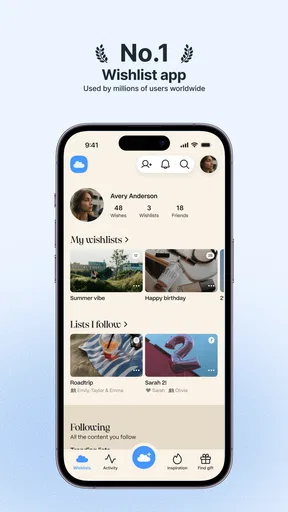
I find it more helpful to think of GoWish as a place to remember possible purchases than as a shop that replaces browsing retailers. When I spot a jacket, kitchen tool, book, or gadget, the useful next step is saving enough information to recognize it later. The app’s appeal is that wishes can be gathered and organized rather than scattered across browser tabs, messages, screenshots, and scraps of paper.
That distinction matters. If you mainly want to compare retailers, check out, or manage orders, a wishlist is not a substitute for those shopping tools. GoWish is better suited to the earlier part of the process: noticing something, deciding it might be worth having, and keeping it visible until you are ready to act. I would use it as a companion to normal shopping, not expect it to handle every part of a purchase.
Making lists useful beyond birthdays
Birthday and holiday lists are an obvious fit, but I think the more interesting use is keeping separate lists for different decisions. A “home ideas” list can hold possible upgrades without turning into an urgent shopping queue; a travel list can collect items to consider before a trip; and a gift list can capture ideas for someone else while they are fresh. Separating those intentions makes it easier to tell a genuine plan from a passing impulse.
A practical habit is to add a short clue when saving an item: who it is for, what occasion it might suit, or what detail made it appealing. Even when the item itself is clear, that context can disappear after a few weeks. I would also review lists before a birthday or seasonal shopping period, removing things I no longer want and checking that each saved wish still points to the right item. A wishlist is only useful if it reflects current preferences rather than every passing thought.
Sharing works best when the list is considered
Sharing a list can spare friends and family the guesswork of asking for gift ideas, but I would treat it as a helpful guide rather than a set of instructions. A short list with a range of genuinely wanted items gives people more room to choose than a collection of expensive or highly specific requests. It can also help avoid duplicate suggestions within a group, provided everyone uses the shared list as intended.
Before sharing, I would check each entry for clarity. A product name alone may not distinguish between similar versions, colors, or sizes, so a useful link or image can make the wish easier to understand. I would also consider whether a list is meant for a particular event or is simply a private collection of things to think about. That small bit of curation makes sharing feel considerate rather than like sending someone an unfiltered shopping backlog.
Worth Reading Before You Choose

EA SPORTS FC Mobile 26 Is a Bigger Football Game, but It Takes Time

Flipboard Shows What News Apps Must Do Beyond the Feed

Switching to Android Auto Means Rethinking Your Driving Routine

Google Calendar Makes a Crowded Week Easier to Manage

Ludo King Makes the Most of the Minutes Between Plans

Baby Panda World Brings Quick Play to Modern Phones, but Its Game Library Feels Busy
Trust, visibility, and sensible boundaries
Wishlists can reveal more than shopping tastes: they may hint at hobbies, plans, personal needs, or upcoming celebrations. That is not a reason to avoid sharing, but it is a reason to pause before treating every list as public information. I would share only the wishes that make sense for the people receiving them and keep other ideas separate. The main practical question is not just whether sharing is convenient, but whether the particular list says only what I intend it to say.
The app’s store age rating is Teen, and the current version is 7.3.0. Those details help identify the app, but they do not replace a personal check of the choices shown inside it. Before adding personal details or inviting others to view a list, I would look at the account and sharing controls available in the app and make sure I understand who can see the content. I would avoid putting sensitive information into a wish entry; a product list does not need private details to do its job.
For anyone deciding whether to install it, GoWish is free, so trying the basic idea does not require a purchase. Still, free does not automatically mean frictionless: the real test is whether adding and maintaining wishes feels easier than your current method. If a quick note already works and you rarely share gift ideas, another app may be unnecessary. If you repeatedly lose saved items or field the same “what would you like?” question, a dedicated list has a clearer purpose.
Everyday use and the small trade-offs
Picture walking through a shop with a friend and spotting a useful coffee grinder, but not wanting to buy it on the spot. You can save the idea, then compare it with other things on your list later, when the initial excitement has passed. If your birthday is coming up, you can share a curated list instead of trying to recall suggestions in a last-minute message. That simple sequence—capture, reconsider, then share—is where I see the app being most helpful.
There is a trade-off between convenience and upkeep. Saving everything is quick, but a crowded list can become another place to procrastinate. I would use categories or separate occasion-based lists with a little discipline, and occasionally remove items that no longer matter. The more carefully I maintain a list, the more useful it is to me and to anyone I share it with. If I wanted detailed budgeting, price comparison across stores, or a complete record of purchases, I would keep using tools designed for those jobs rather than expecting a wishlist to provide them.
Compared with a notes app, GoWish is purpose-built for collecting and sharing things you want, while a general note can be more flexible for mixed reminders and planning. Browser bookmarks are handy for saving pages, but they can become difficult to sort into gift ideas or occasions. Sending links in a group chat is immediate, yet those messages are easy to lose among everyday conversation. The right choice depends on the problem: I would pick GoWish when the list itself and sharing it are central, and a note or bookmark folder when I only need a private, lightweight reminder.
One more useful check is to revisit an item before sharing it: confirm that it is still the right version and that the link or image makes the intended product clear. This is especially worthwhile for items with similar models or sizes. A saved wish captures a moment of interest; it does not guarantee the product will remain available or that the original choice still suits you. Treating the list as a shortlist to review, rather than an automatic buying plan, helps keep it practical.
What’s GoWish All About?
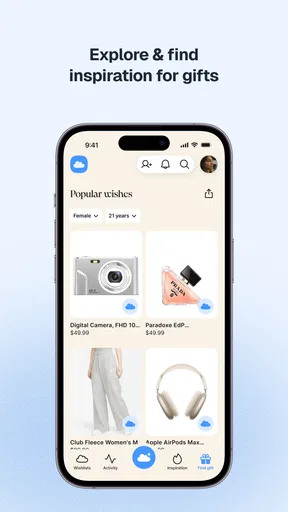
GoWish is all about making your wishlist dreams come true. Imagine having a digital notepad where you can jot down everything you ever wanted, from that sleek new gadget to the quirky little knick-knacks you didn’t even know you needed. With GoWish, organizing your desires has never been easier.
Easy Peasy Setup
Setting up GoWish is a breeze. Once you've downloaded it, you’re welcomed with a clean and intuitive interface that’s a joy to navigate. I mean, who doesn’t appreciate an app that doesn’t make you jump through hoops just to get started?
Features That Make You Go "Wow"
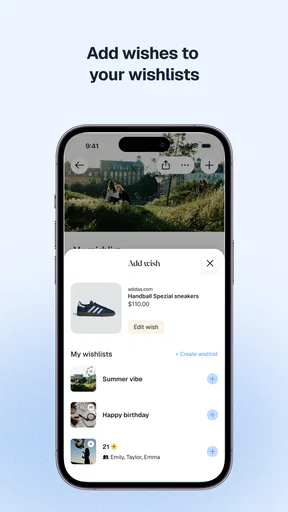
What really sets GoWish apart is its user-friendly features. You can effortlessly add items to your wishlist with a simple tap. Whether you’re browsing online or out window shopping, just snap a picture or add a link, and voila! It’s on your list.
And here’s the kicker – GoWish lets you categorize your wishes. You can create lists for birthdays, holidays, or even that dream vacation shopping spree. It’s like having a personal shopping assistant right in your pocket.
Sharing is Caring
One of the coolest features is the sharing option. You can easily share your wishlist with friends and family. So, if your birthday’s coming up and you want to drop some not-so-subtle hints, GoWish has got your back. No more awkward "what do you want?" questions – just share and wait for the awesomeness to roll in.
Always Stay Updated
The app’s notification system is top-notch. It keeps you updated with price drops and availability of items on your list. So, if that dream gadget goes on sale, you’ll be the first to know. It’s like having a personal shopper whispering sweet deals in your ear.
A cautious verdict
My recommendation comes with a small qualification: GoWish is most useful if you will actually keep your lists tidy and want to share selected gift ideas. Its shopping focus and sharing tools give it a more direct purpose than a plain note, but those who prefer a private, no-frills reminder may be happier with a notes app or bookmarks. The average rating of 3.3 across about 7,100 ratings suggests experiences are not uniformly glowing, so I would try it with one simple list before moving every saved idea into it.
In a nutshell, GoWish is a must-have for anyone who loves to keep their shopping desires organized and stress-free. It’s not just an app; it’s a lifestyle upgrade. So, if you’re looking to make your wishlist dreams a reality, give GoWish a whirl. You’ll wonder how you ever lived without it.
Ready to dive into the world of organized wishlisting? Download GoWish today and let the shopping magic begin!
Pros
- Easy-to-use interface for quick list creation.
- Customizable categories for better organization.
- Shareable links to send wishes to friends.
- Price tracking for budget-conscious users.
- Cross-platform sync to access lists anywhere.
Cons
- Limited customization of wish list themes.
- Occasional sync delays with cloud storage.
- Ads can be intrusive in the free version.
- No offline mode for wish list access.
- Limited integration with third-party apps.
FAQs for GoWish - Your Digital Wishlist
What is GoWish and how does it work?
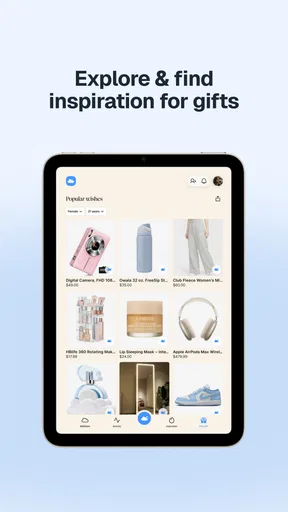
GoWish is a digital wishlist application designed to help users organize and share their wishlists with friends and family. The app allows you to create multiple lists for different occasions, add items with links or descriptions, and track who has purchased what. It’s perfect for birthdays, weddings, and holidays.
Is GoWish available on both Android and iOS?
Yes, GoWish is available for download on both Android and iOS platforms. You can find it on the Google Play Store for Android devices and the Apple App Store for iOS devices. This ensures compatibility across a wide range of smartphones and tablets.
Does GoWish require an internet connection to function?
GoWish primarily functions online to sync your wishlist data across devices and share it with others. However, you can still access your wishlist offline, though any changes will only sync once you're back online. This allows for flexibility when you’re on the go.
Can I share my wishlist with others who do not have the app?
Yes, GoWish allows you to share your wishlist with anyone, even if they do not have the app installed. You can send your wishlist via a unique link through email, messaging apps, or social media platforms, enabling easy access for your friends and family.
Is my data secure with GoWish?
GoWish prioritizes user privacy and data security. The app uses encryption to protect your information and complies with standard data protection regulations. Additionally, you can control what information you share and who you share it with, ensuring a secure user experience.


